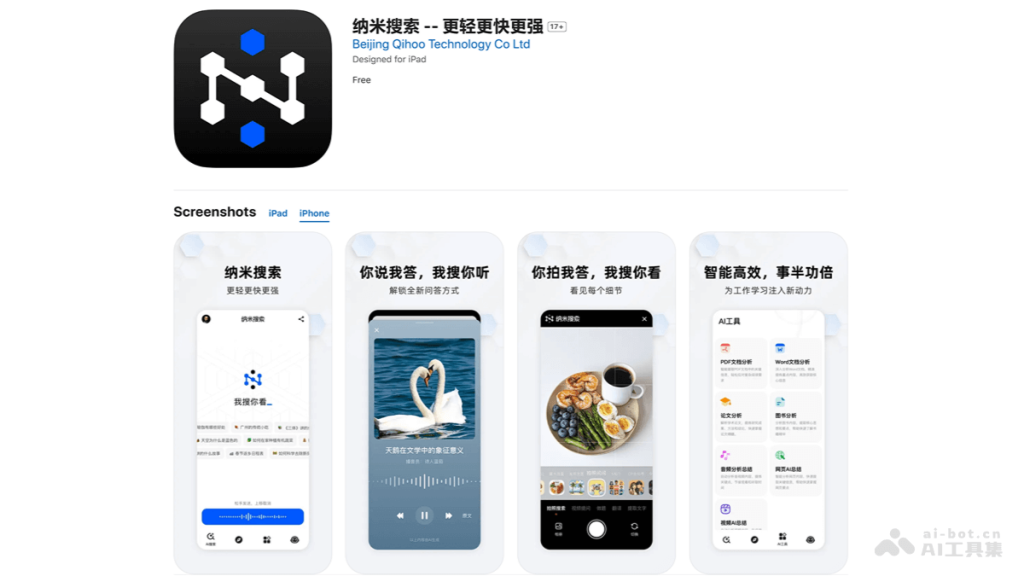
What is nanosearch
NanoSearch was launched by 360 GroupAI Search Applicationcollection of search, reading,writingIntegrate with creation, redefines the AI search experience. Nano search supports a variety of search methods such as text, voice, photography and video, and provides comprehensive solutions from simple to in-depth to help users easily solve various problems. NanoSearch also integrates the capabilities of 16 large models and is equipped with a variety of intelligent tools to improve the efficiency of scenarios such as writing, analysis, translation and travel planning.
Zhou Hongyi said that “search” refers to the “answer engine”, which can conduct multi-modal searches, so that you can search by “saying” and “photos”, which can be used by both men, women, and young people; “learning” refers to the “learning engine”, which can be carried out in-depth Understand, learn in depth, and explore with users, which is especially suitable for students; “writing” refers to “writing engine”, which can be rewrite graphics, text and videos, so that everyone can write good articles, especially suitable for office workers;“Creation” refers to “creation engine”, which can be used as a content creation platform to enable all search results to generate videosespecially suitable for content workers and marketing workers.
The main functions of nanosearch
- Multidimensional interaction: Supports various search methods such as text, voice, photography, and video to meet the search needs in different scenarios.
- Multiple answers: Provide comprehensive and comprehensive solutions from concise to in-depth, helping users solve various problems such as identifying people, objects, problem solving, and travel strategies.
- AI robot: Gathering the capabilities of 16 top large models to provide a one-stop AI smart experience.
- AI Tools: Equipped with dozens of smart tools, helping users improve efficiency in writing, analysis, translation, travel planning, etc.
- AI Talk Show: Based on AI multimodal technology, all search results can generate videos, giving sound to knowledge, making the knowledge acquisition process simpler and more interesting.
How to use nano search
- Download and install: Computer access to nano search official website:n.cn or mobile phoneaccessApple App StoreorAndroid App Store,Search the “NanoSearch” app.Download and install on your phone or tablet.
- Open the app:After the installation is complete, open the NanoSearch App.
- Familiar interface:Browse the main interface of the app to learn about different functional modules and search options.
- Choose a search method:Select text, voice, photo or video search method according to the content you need to query.
- Conduct a search:
- If you select Text Search, enter the keywords directly in the search box.
- If you select Voice Search, click the microphone icon and say your question.
- If you choose Photo or Video Search, use the camera function to take photos or videos.
- Get results:After submitting the search, nanosearch will provide relevant search results.You can browse these results and select the most relevant information to view.
- Using AI Tools:Smart tools integrated in the App, such as writing, analysis, translation, etc. can be used.
- Experience an AI talk show:If you want to obtain information by listening/watching videos, you can experience the AI talk show function and generate videos through all search results.
Product advantages of nanosearch
- Multidimensional interactive search method: Users can choose various search methods such as text, voice, photography or video based on their needs and preferences. Whether they are looking for information, identifying objects or obtaining travel guides, they can find a search method that suits them. The diversified search methods lower the threshold for users to use, and users of different ages and technical levels can easily get started, improving the convenience and accessibility of search.
- All-round and diverse answers: Whether it is simple query or complex analysis, nanosearch can provide solutions from concise to in-depth answers, helping users solve diverse needs such as people, objects, problem solving, and travel strategies. The comprehensive solution allows users to obtain the information they need without switching between multiple platforms, saving time and energy.
- Multi-AI Robot Integration: NanoSearch brings together the capabilities of 16 top large models, and users can perform complex queries and task processing through AI robots. Able to understand and respond to users’ complex queries and provide more accurate and personalized search results.
- Equipped with rich smart tools: NanoSearch is equipped with dozens of smart tools, suitable for writing, analysis, translation, travel planning and other scenarios. It can help users improve efficiency in specific areas. For example, using translation tools can quickly obtain multilingual information, while writing tools can help users write and edit documents.
- AI Talk Show: Nano search gives voice to knowledge through AI talk shows, and users can obtain information by listening. Innovative ways to acquire knowledge not only increase the fun, but also obtain information when you are busy or inconvenient to read, improving the acceptability of knowledge.
Application scenarios of nano search
- Academic research and knowledge acquisition:Nano-search can be used as a tool for academic research, helping researchers quickly find relevant academic papers, patents and technical reports, especially in the field of nanotechnology.
- Daily information query:Users can use nano searches to query various information in daily life, such as weather forecasts, news information, health knowledge, etc.
- Language Translation and Cross-cultural Communication:NanoSearch’s translation tools can help users to translate language and promote cross-cultural communication and international communication.
- Travel planning and strategy:Using the travel guide function of nano-search, users can obtain information about their travel destinations, including introductions to attractions, itinerary planning and local culture.
- Education and Learning:Students and teachers can use nanosearch to assist in learning and teaching, obtain educational resources and answer academic questions.
- Work Assistance:Smart tools for nanosearch can help people in the workplace improve their work efficiency, such as document writing, data analysis and project management.
- Creative Writing and Content Creation:Content creators can use the writing assistive features of nanosearch to inspire creativity, proofread text and optimize content.
- Image and video recognition:Users can upload pictures or videos and use the image recognition function of nano-search to obtain more relevant information, such as identifying plants, animals, landmarks, etc.
© Copyright Statement